OAuth Authentication
This section describes the setup procedure for using OAuth authentication with OpenID Connect compliant authentication provider in the MailDepot Administration Console.
Supported Provider
MailDepot supports following OpenID Connect authentication providers.
- KAOauth (https:///www.kaoauth.com)
- Microsoft Entra ID
- Google Identity
MailDepot provides user authentication using the OAuth 2.0 authorization protocol with authentication provider.
Configuration File
To use OAuth authentication with MailDepot dministration Console, you need to create the following configuration file.
/opt/maildepot3/domain/DOMAIN/etc/oauth.conf
Set the following parameters in the above configuration file.
| Parameter Name | Description |
|---|---|
| provider_name | Name of Provider |
| authorize_endpoint | Endpoint for Authoirzaion API |
| token_endpoint | Endpoint for Token API |
| userinfo_endpoint | Endpoint for Userinfo API |
| token_scope | OAuth scope parameter | user_attr | Attribute name for login name | client_id | OAuth client ID | client_secret | OAuth client secret |
The setting values for the above parameters differ depending on the authentication provider.
And the client ID and client secret are provided by authentication provider.
To obtain these values from the authentication provider, you need to register an OAuth client on the authentication provider.
- Setting for KAOauth
-
Parameter name Parameter value provider_name KAOauth authorize_endpoint https://DOMAIN_NAME/openid/authorize token_endpoint https://DOMAIN_NAE/openid/token userinfo_endpoint https://DOMAIN_NAE/openid/userinfo token_scope openid profile user_attr login_name An example configuration for KAOauth is shown below.
provider_name = KAOauth
authorize_endpoint = https://****.auth.kaoauth.com/openid/authorize
token_endpoint = https://****.auth.kaoauth.com/openid/token
userinfo_endpoint = https://****.auth.kaoauth.com/openid/userinfo
token_scope = "openid profile"
user_attr = "login_name"
client_id = "*******"
client_secret = "********"
- Setting for Microsoft Entre ID
-
Parameter name Parameter value provider_name Microsoft authorize_endpoint https://login.microsoftonline.com/TENANT_ID/oauth2/v2.0/authorize token_endpoint https://login.microsoftonline.com/TENANT_ID/oauth2/v2.0/token userinfo_endpoint https://graph.microsoft.com/v1.0/me token_scope openid email user_attr mail An example configuration for Microsoft Entre ID is shown below.
provider_name = Azure
authorize_endpoint = https://login.microsoftonline.com/********/oauth2/v2.0/authorize
token_endpoint = https://login.microsoftonline.com/********/oauth2/v2.0/token
userinfo_endpoint = https://graph.microsoft.com/v1.0/me
token_scope = "openid email"
user_attr = "mail"
client_id = "*******"
client_secret = "********"
- Setting for Google Identify
-
Parameter name Parameter value provider_name Google authorize_endpoint https://accounts.google.com/o/oauth2/auth token_endpoint https://accounts.google.com/o/oauth2/token userinfo_endpoint https://www.googleapis.com/oauth2/v1/userinfo token_scope openid email user_attr email An example configuration for Google Identify is shown below.
provider_name = Google
authorize_endpoint = https://accounts.google.com/o/oauth2/auth
token_endpoint = https://accounts.google.com/o/oauth2/token
userinfo_endpoint = https://www.googleapis.com/oauth2/v1/userinfo
token_scope = "openid email"
user_attr = "email"
client_id = "*******"
client_secret = "********"
Registation of OAuth client
To use OAuth authentication with MailDepot Administration Console, you need to register an OAuth client on your authentication provider.
When registering OAuth client on authentication provider, you need to register the redirect URI for your site.
Specify the following URL of MailDepot Administration Console as the redirect URI.
| HTTPS is disabled | http://HOSTNAME/DOMAIN/oauth/callback |
|---|---|
| HTTPS is enabled | https://HOSTNAME/DOMAIN/oauth/callback |
You need to specify the host name of the MailDepot server for HOSTNAME, specify the domain that was created during MailDepot installation for DOMAIN.
Automatic User Registration
When automatic user registation is enabled on "Register New User" screen, MailDepot create account for user who is authenticated with OAuth provider.
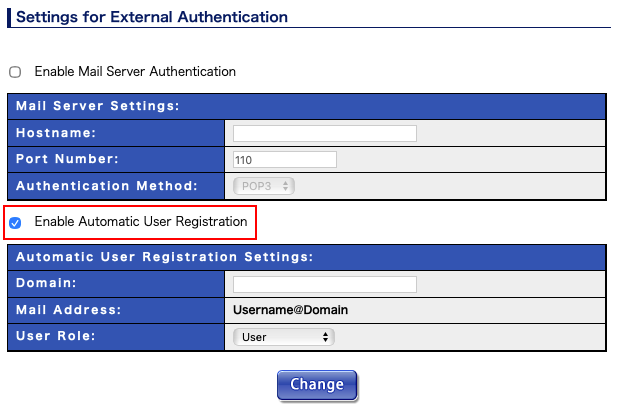
If automatic user registration is disabled and authenticated user by OAuth provider does not have account on MailDepot, that user cannot log in to the MailDepot Administration Console.
Login with OAuth
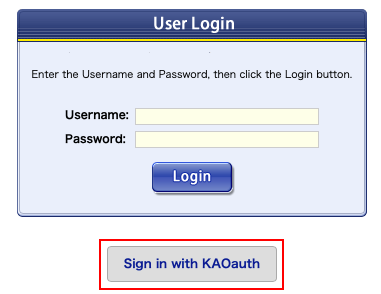
When OAuth authentication for the MailDepot Administration Console is configured, the login screen will display an login button for OAuth authentication.