
Reports
Here, you can see disk capacity and storage usage for archiving, or the reports related to the archived mails.
Some reports are displayed using pie charts and line charts.
Report summary
This report displays the disk capacity for archiving, the current disk usage for archived mails, physical disk usage, etc.
License capacity usage status
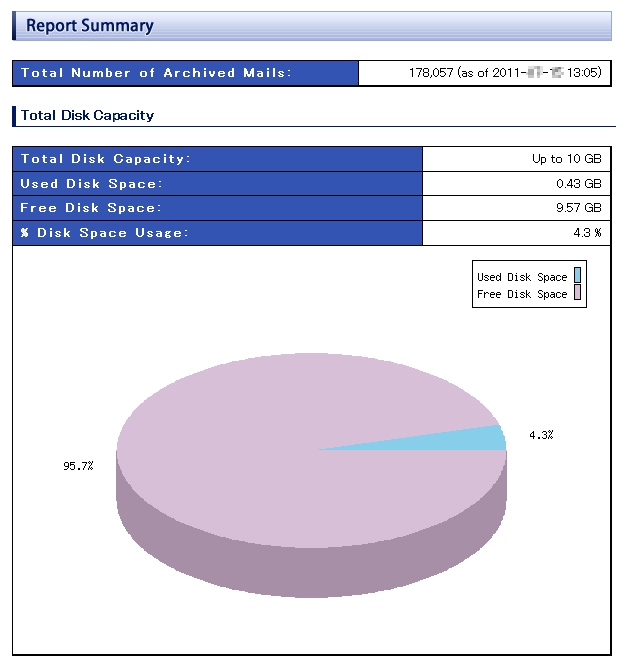
The total number of archived mails at the time indicated within brackets is displayed.
The meaning of the each item is as follows.
| License capacity | The logical disk capacity for archiving limited by software license or maximum volume for target domain. |
|---|---|
| Usage within the license | Total used volume of database used by archived mails. |
| Free space within the license | Remaining usable space after subtracting "Usage within the license" from "License capacity". |
| Usage rate within the license | percentage of "Used disk space" in "License capacity". |
Physical disk space
Physical disk space used by Maildepot are displayed.

The meaning of each item name is as follows.
| Disk Location | Mount Point of disk. |
|---|---|
| Size | Size of total disk space. |
| Disk Used | Size of Used disk space. |
| Free space | Size of avaiable disk space. |
| Disk Usage | Percentage of "Used disk space" in "Total disk space". |
Traffic Summary
This report shows the number/volume of archived mails for every month/week/day.
Select the unit and range for from the selection and click "Display" button to show the results.
By default, the monthly data of the previous month is displayed.
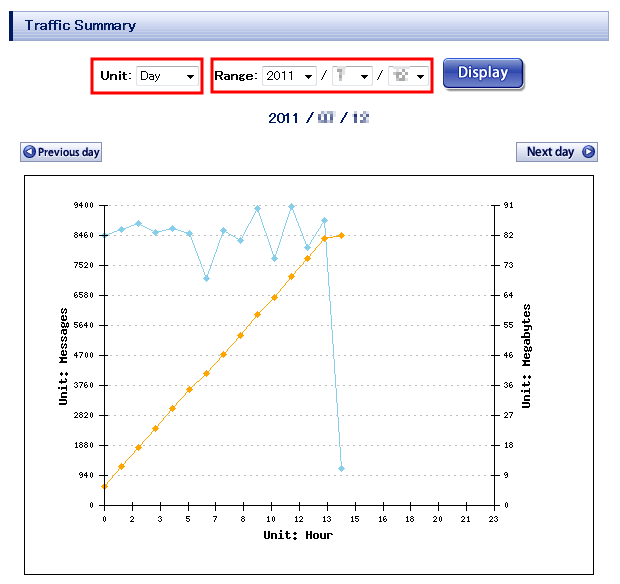
You can click "Next month/week/day" or "Previous month/week/day" button to shift the range.
Further, you can see the detailed data in the list.
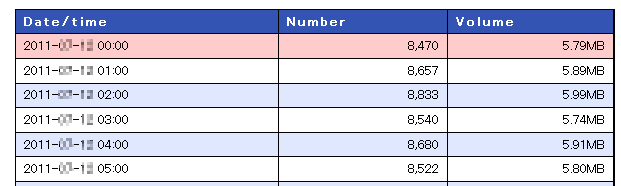
The meaning of the each item is as follows.
| Date/time | Date and time when the mail was archived. |
|---|---|
| Number | Total number of archived mails. |
| Volume | Total size of archived mails. |
Domain ranking / User ranking
This report shows the domain/user ranking based on the number/volume of incomming/outgoing mails in a selected date.
The displayed record in ranking to be changed at "Personal Settings" screen in Administration Console.
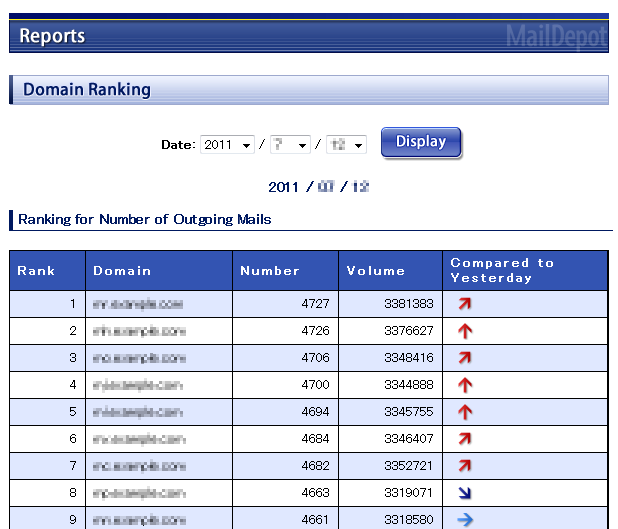
The meaning of the each item is as follows.
| Rank | Order in ranking . Higher numbers/volumes are ranked higher. | ||||||||
|---|---|---|---|---|---|---|---|---|---|
| Domain/User | For domain ranking, the domain is the part of the mail address after @. For user ranking it is the mail address. |
||||||||
| Number | Total number of sent/received mails. | ||||||||
| Volume | Total volume of sent/received mails. | ||||||||
| Compared to previous day |
Comparison to the previous day is shown with following mark.
|


